daily rate: $125+ insurance & GST
Full day rate: $55.00
Total including 5% insurance & 10% GST : $63.53


Key Features:

Reliable Wireless Monitoring
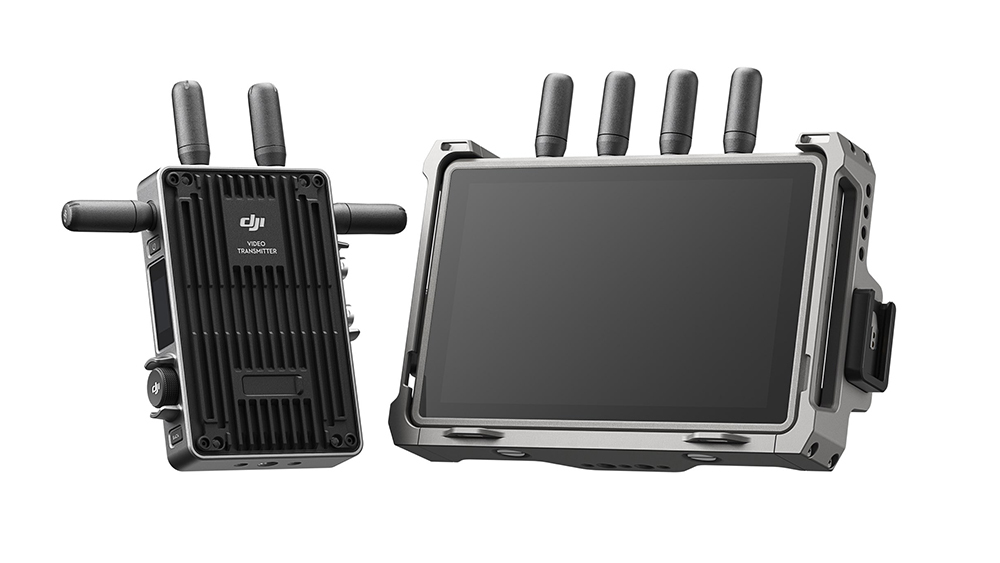
DJI SDR Transmission 2 is a multi-group wireless video transceiver that keeps camera monitoring stable on complex shoots. It pairs DCI 4K/60fps 10-bit HDR transmission with H.265 video, Auto Channel 2.0, & a high-bitrate link so directors, operators, & focus pullers can stay connected without constant re-pairing.
Automatic Channel 2.0
DJI SDR Transmission 2 uses Auto Channel 2.0 to manage frequencies automatically when Channel Mode is set to Auto. With better spectrum scanning & conflict diagnostics, the system can move intelligently as interference changes across a crowded set.
That makes it easier to keep the link stable when multiple transmitters & receivers are operating side by side. The result is less time spent reconfiguring & more time staying focused on the shot.
DCI 4K Monitoring
DJI SDR Transmission 2 delivers DCI 4K/60fps, 10-bit HDR, & H.265 video up to 50 Mbps. The result is a cleaner monitoring image with rich detail & smoother colour transitions.
Extended Range
Transmission reaches up to 4 km under CE compliance testing in open, unobstructed, interference-free controlled conditions. That gives crews room to work on large locations, car rigs, & wide outdoor setups.
Ultra Low Latency
Transmission reaches up to 4 km under CE compliance testing in open, unobstructed, interference-free controlled conditions. That gives crews room to work on large locations, car rigs, & wide outdoor setups.

Camera Switching
No more rebooting, scanning, & re-pairing. Switch between camera feeds from the transceiver or the DJI Ronin app, saving valuable time on set.
Monitor Feed
Delivers an ultra-high-definition, low-latency feed to professional monitors over SDI, HDMI, or DP, so multiple monitors can share the same clean image.

Mobile Feed Workflow
Connect the transceiver to a smartphone or tablet with a USB-C to USB-C or USB-C to Lightning cable & view the feed in the DJI Ronin app. It is a simple way to monitor on the move.

Includes:
Links & Downloads:
For a trouble free experience please follow these steps.
Step 1:
Explore the options then add your gear to the Camera Bag. If what you’re after is not listed please add it in comments or simply Contact Us.
Step 2:
View your Camera Bag & select the date & duration of the hire including the desired collection time.
Step 3:
Once you're done review your Camera Bag & add any special requirements in the Message field. Urban Cine will follow up with questions &/or answer your questions.
Step 4:
Submit to request a quote. You'll receive a copy. Urban Cine will send you a formal quote if required.
Step 5:
Pick Up & Return: Typically after 2:00pm the day before the hire, & by 11:00am the day after the hire. Picking up the day before gives you the opportunity to familiarise yourself with the equipment & check that everything is in order before your shoot the next day.
Step 6:
Payment: For new customers payment is required prior or on collection. If you have a history with Urban Cine a credit account may be offered.
Step 7:
Insurance & ID: To ensure insurance for hired equipment is valid Urban Cine Pty. Ltd. asks you to verify your identity. By doing so you are supplying the required 100 points of ID. This will protect both you the Hirer & Urban Cine Pty. Ltd. You will receive a text message. Just follow the prompts. For more info see OCR Labs IDKit
Step 8:
Using Equipment: It’s fair & reasonable to expect the hirer has the skillset to use equipment in a respectful & professional manner.
Step 9:
Report Issues: Please report equipment failures & breakages. Feedback is important. If you’re experiencing issues with equipment on set please call us asap. Often issues can be rectified over the phone.